
Recently, a lot of people have asked for Intellisense support for AngularJS in the Visual Studio HTML editor. The bad news is that there is no extensibility for providing additional HTML attribute Intellisense, so I can’t ship this support in Web Essentials.
The good news is that we can accomplish this through a more manual mechanism.
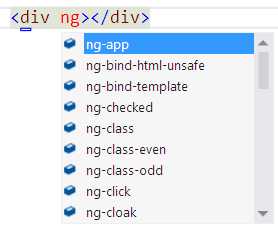
Here’s what you need to do:
Step 1
Find the file commonHTML5Types.xsd located in the Visual Studio install directory and back it up (just in case). Mine is here: C:\Program Files (x86)\Microsoft Visual Studio 11.0\Common7\Packages\schemas\html
Step 2
Download this new version of commonHTML5Types.xsd and replace the existing one from the directory in Step 1 with it.
Step 3
Restart Visual Studio and that's it. You now have all the ng-* attributes available in Intellisense. This Works On My Machinetm, so please let me know if it works on yours too.
I still want to add native support in either Visual Studio or Web Essentials, so if this is something you’re interested in, please vote for it here.
Comments
Is it possible to extend resharper?
nice job. it works
That doesn't seem to work for me with ReSharper (VS 2012.1). What exactly does the category="Angular" attribute do?
This does not work for me (i have resharper too)
Thanks for sharing. I have created the VS2010 version for anybody who's interested. http://sdrv.ms/Xp1KPF
Awesome!! Thanks for confirming
Nice! Thanks
For everyone using ReSharper: You could either disable ReSharpers Intellisense for HTML (you'll easily find it in the settings) or you can go ahead and get a Resharper plugin called resharper-angularjs. https://github.com/JetBrains/resharper-angularjs Note that you'll need the ReSharper SDK to compile the plugin.
thanks mads kristensen ;)
I did something similar for jQuery Mobile data- attributes a couple years ago in Visual Studio 2010. The project is on github, but I haven't updated for VS2012 or recent version of jQuery Mobile. Feel free to take if it has value. https://github.com/hakanson/intellisense-jquery-mobile
Works. :-) Thank you so much.
What about putting the Angular attributes in a new angular.xsd and referencing it from commonHTML5Types.xsd using <xsd:import schemaLocation="angular.xsd"/> ? It'd still require an edit to commonHTML5Types.xsd but would work better with any other edits or additions.
Pingback from scoop.it AngularJS Intellisense in Visual Studio 2012 | Web Apps with CoffeeScript | Scoop.it
Hi
Pingback from codingtv.pl Coding News 04.03.2013 - codingtv(); - video-blog programistyczny
Thanks for sharing! My tiny tiny contribution: ** I like not to have complaints and green squiggles for unknown HTML5 attributes, so I always use the data-ng-* version of angular attributes. Hence I just cloned the xsd:attribute items inside angularJSDirectives.xsd, obtaining name=”data-ng-app”, name=”data-ng-bind”, and so on ** ng-app seems to be listed twice
Since it is JetBrains that made ReSharper, maybe you should try asking them!
After a quick lookup on their site, the answer is yes http://confluence.jetbrains.com/display/ReSharper/ReSharper+7+Plugin+Development
I found open source that already https://github.com/refactorthis/angularjs-visualstudio
Awesome! Needs "ng-submit."
Ha, I don't like the squiggles either :-)
Thank you very much. it is working...
Pingback from feedproxy.google.com Interesting Things Circa March 2013 - Jon Galloway
Very useful, thank you! Modified to use data-ng-* instead. For this interested in doing the same, open the file in notepad, find-and-replace [i]name="ng-[/i] with [i]name="data-ng-[/i]
I added some missing tags (mostly form-related ones like ng-pattern) in a gist here: https://gist.github.com/markrendle/5356469
Pingback from hostgatorcouponcodesite.com Sites We Like | Latest Official Hostgator Coupon Codes | Save more than $599 + 25% OFF + 1 Month FREE.
Thanks Mads, this is a great help! What I'd still like to see though is javascript intellisense for angular. While I can get one or two method names to pop up by adding a script reference to angular.js at the top of my .js file, there's no parameter information and lots of other missing things. What's needed is a vsdoc file with XML comments as has been done for jQuery. Do you know if anyone has any plans to generate such a file for angular?
Thank you very much. it is working...
@John, this is a bigger "Javascript" problem. Consider looking at TypeScript which tackles the typing problem head on, and in a beautiful way. Type mappings for Angular as well as many other JS frameworks are maintained here: https://github.com/borisyankov/DefinitelyTyped
Thanks. It worked for me. This is really great.
For Visual Studio 2012 and Resharper < 8, you'll want to navigate to the github repository for resharper-angularjs (https://github.com/JetBrains/resharper-angularjs) and install the bits. If you're using Resharper 8 you can simply open Visual Studio -> Resharper Toolbar -> Extension Manager, then in the Online Extensions you'll find an AngularJS extension. However, you'll notice in Visual Studio 2013 that these elements don't show collapsed, ng-...,
Nice Buddy it's works fine....... Thanks for sharing this
Many thanks. It worked well.
Thanks a lot! IT worked like a miracle!!
yes this is great