
Line length is one of those conventions that teams agree on easily and enforce inconsistently. EditorConfig gives us a shared vocabulary with max_line_length, but Visual Studio does not natively draw a boundary for it or apply it during formatting.
That gap is what inspired Max Line Length. The extension makes the effective EditorConfig value visible in the editor and adds a carefully constrained reflow pipeline for formatting and Code Cleanup.
Starting with the effective EditorConfig value
The extension does not introduce a second configuration system. A repository can declare its convention as usual:
[*.{cs,vb}]
max_line_length = 120
For each text view, Max Line Length resolves the effective value for the document, including nested configuration files and matching sections. If the value is missing, invalid, or set to unset, the ruler is removed.
The interesting part is keeping the editor responsive when configuration changes. The adornment listens for refresh notifications, resolves file-based settings away from the UI thread, then switches back to the main thread before updating the view. A version counter prevents stale asynchronous results from replacing newer configuration values.
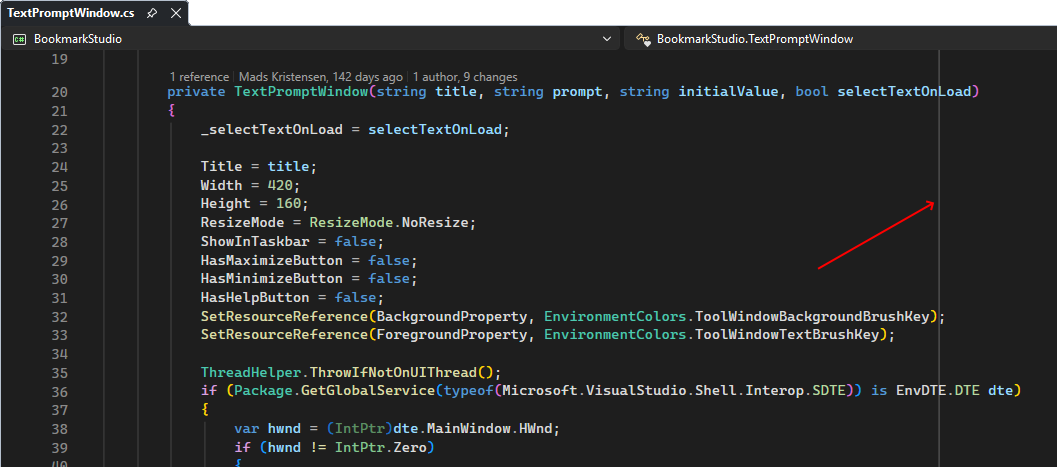
Drawing a ruler without interfering with editing
The ruler is implemented as a Visual Studio editor adornment. The extension obtains an IWpfTextView, creates an IAdornmentLayer, and owns a WPF Line element. Its horizontal position is calculated from the formatted line source, indentation, column width, and the resolved maximum length.
The adornment follows layout changes, so it tracks scrolling, zoom, font changes, and viewport updates. It is not hit-testable and does not intercept mouse or keyboard input. The extension also checks for Visual Studio's diff view role and does not display the ruler there.
Color customization uses Visual Studio's format map rather than a private option. The Max Line Length ruler format is exposed through Fonts and Colors, and the adornment reads the configured foreground brush when it redraws.
One reflow service for several editor commands
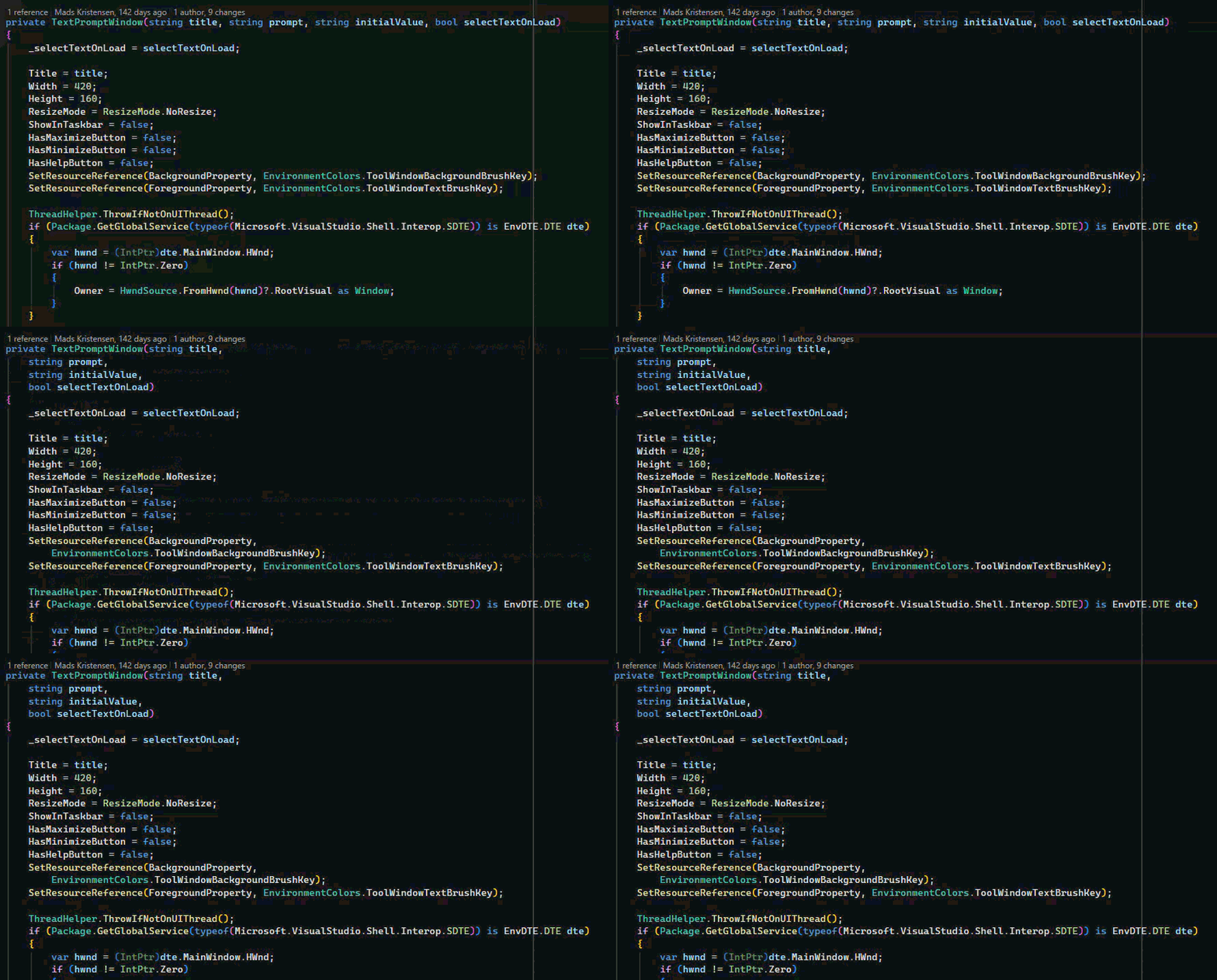
Formatting support began as command-specific logic, but that quickly creates inconsistencies. The extension now centralizes the decision in DocumentReflowService. It determines whether a content type can be reflowed, selects the appropriate engine, and applies the resulting text changes.
Visual Studio's MEF composition supplies the classifier service used for comment-aware languages. For C# and Visual Basic, the extension uses language-specific reflow engines for lists and expressions. For classified-comment content types such as JavaScript, TypeScript, C++, CSS, LESS, SCSS, and SQL, it asks the editor classifier for comment spans and limits changes to those spans.
Markdown and plain text use separate engines so that structural constructs remain intact. Markdown headings, tables, lists, block quotes, code fences, inline code, HTML, front matter, and hard line breaks are protected instead of being treated as ordinary prose.
Being conservative is a feature
Reflow changes source text, so the extension intentionally avoids transformations that could alter meaning. C# and Visual Basic string and character literals are left alone. Structured XML documentation elements, examples, lists, and preformatted content are preserved while ordinary documentation prose can be wrapped.
Formatter suppression markers provide an explicit escape hatch. The extension recognizes @formatter:off and @formatter:on in the relevant comment syntax and excludes the protected region from reflow.
Selection formatting is similarly constrained. It operates on complete selected lines or complete C# and Visual Basic syntax constructs rather than making partial edits that could produce surprising results.
Adding Code Cleanup without changing existing profiles
The Code Cleanup integration is opt-in. The fixer is exported through Visual Studio's ICodeCleanUpFixerProvider and exposes a localized fix ID named Reflow lines to configured maximum length.
When enabled in a cleanup profile, the fixer obtains the document path, resolves the same ReflowOptions used by the formatting commands, and sends the buffer through DocumentReflowService. This keeps document cleanup and manual formatting consistent.
The fixer is disabled unless the user explicitly adds it to a profile. That default matters: installing an extension should not silently change existing cleanup behavior. The integration supports document cleanup and cleanup on save, while project and solution cleanup are not intercepted.
Lessons for other Visual Studio extensions
- Use the editor's effective configuration instead of creating a parallel options system.
- Keep UI adornments lightweight and recalculate them from the current formatted line source.
- Centralize behavior shared by commands, cleanup, and future entry points.
- Use classifications and syntax-aware boundaries to avoid editing executable code accidentally.
- Make automated cleanup opt-in when it can change source text.
- Design asynchronous refresh paths so stale results cannot overwrite newer state.
Try it or inspect the implementation
Install Max Line Length from the Visual Studio Marketplace, or download the latest CI build from the Open VSIX Gallery.
The complete source is available on GitHub. The project is a useful example of combining editor adornments, EditorConfig resolution, MEF services, content classifiers, language-aware text transformations, and Code Cleanup integration in a focused Visual Studio extension.
Comments
1